by
by 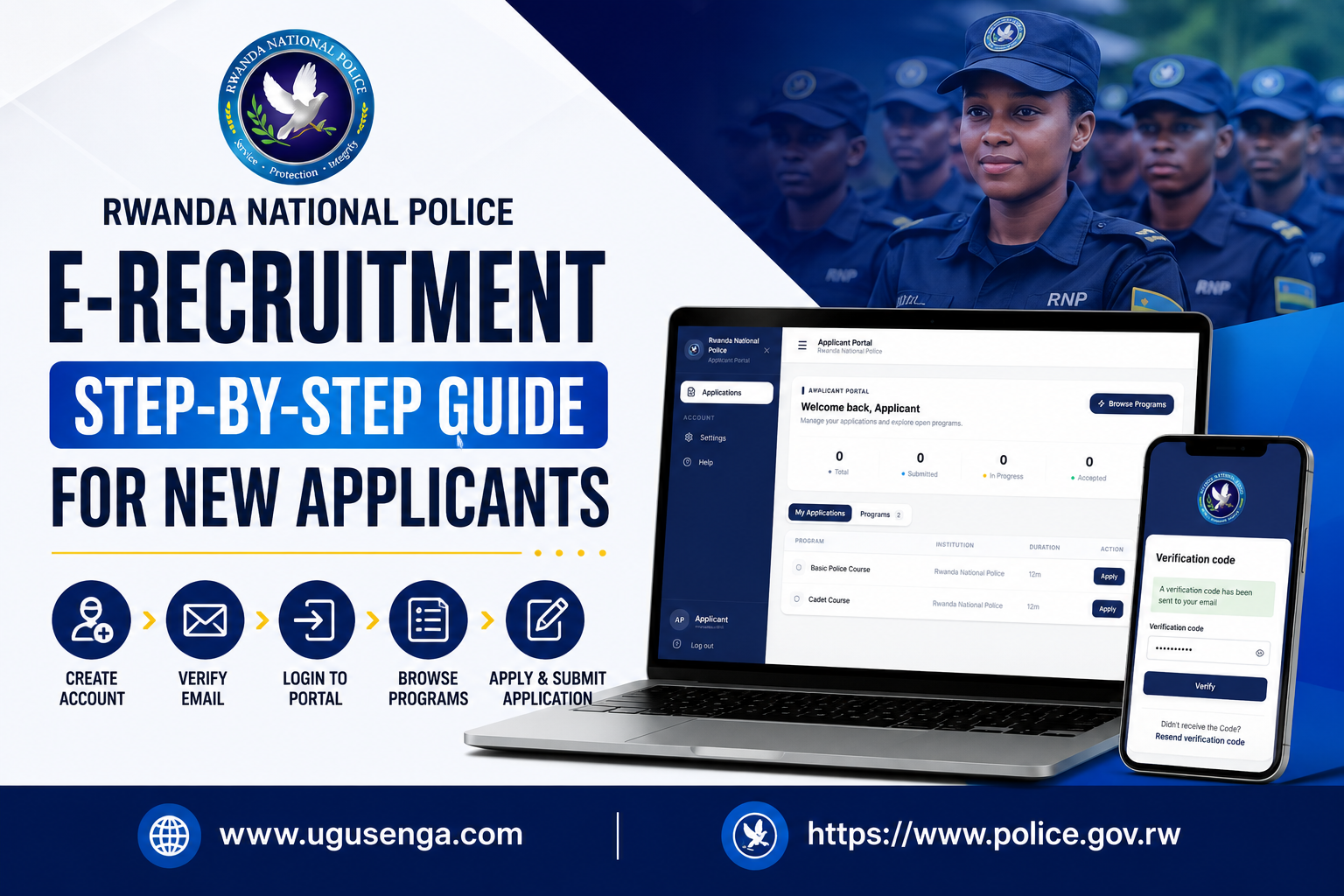
Rwanda National Police E-Recruitment: Step-by-Step Guide for New Applicants
If you are interested in joining the Rwanda National Police, the application process can be completed through the Rwanda National Police e-recruitment Applicant Portal. New applicants are required to create an account, verify their email address, log in to the Applicant Portal, and select the available recruitment programme they wish to apply for.
Below is a simple step-by-step guide based on the current e-recruitment process.
Step 1: Access the Rwanda National Police E-Recruitment Portal
Start by visiting the official Rwanda National Police recruitment/application portal using a web browser such as Google Chrome.
When the recruitment portal opens, look for the option to create an account if you are applying for the first time.
Important: Always make sure you are using the official Rwanda National Police recruitment platform and avoid websites or individuals asking you to pay money to create an account or submit an application.
Step 2: Create a New Applicant Account
If you are a new applicant, select Create Account.
You will be taken to an account registration page where you need to provide:
- Email Address
- Password
- Confirm Password
Password requirements
Your password must meet the requirements displayed on the portal. From the application screen, the password must contain:
- At least 8 characters
- At least one uppercase letter
- At least one lowercase letter
- At least one number
- At least one special character, such as!, @, #, $, %, ^, &, or *
- The password and confirmation password must match
After entering all the required information correctly, click Create Account.
Step 3: Check Your Email for the Verification Code
After successfully creating your account, the system will send a verification code to the email address you used during registration.
Open your email account and look for the verification message from the recruitment system.
If you do not immediately see the message:
- Check your Inbox.
- Check your Spam/Junk folder.
- Make sure you entered the correct email address.
- If necessary, use the Resend verification code option displayed on the portal.
Step 4: Enter the Verification Code
Return to the recruitment portal.
You will see a Verification Code page asking you to enter the code that was sent to your email.
Enter the verification code in the provided field and click Verify.
If the code is correct, your email address will be verified and you can continue to the Applicant Portal.
Step 5: Log in to the Applicant Portal
After verifying your email, log in using the account credentials you created.
The Applicant Portal provides a central place where you can manage your applications and view available recruitment programmes.
The portal shown in the recruitment demonstration contains sections such as:
- Applications
- Settings
- Help
- My Applications
- Programs
Step 6: Browse Available Recruitment Programmes
From the Applicant Portal, select Browse Programs or go to the Programs section.
Available recruitment programmes will be displayed for eligible applicants.
In the demonstration shown, two programmes are displayed:
- Basic Police Course
This programme is listed under the Rwanda National Police and has a displayed duration of 12 months.
Applicants who meet the official eligibility requirements can select Apply to begin the application.
- Cadet Course
The portal also displays the Cadet Course, which is also shown with a duration of 12 months.
Eligible applicants can select Apply to start the application process.
Important: The programmes and deadlines displayed on the portal may change. Applicants should always check the current recruitment announcement and the information displayed in their Applicant Portal before applying.
Step 7: Select “Apply”
After deciding which available programme you want to apply for, click the Apply button next to that programme.
The system will then guide you through the application process.
Make sure that the information you provide is:
- Correct
- Complete
- Consistent with your official documents
- Entered exactly as requested by the recruitment system
Step 8: Complete Your Application Carefully
Continue through each section of the application form and provide all information requested by the system.
Before submitting, carefully review your information to make sure there are no mistakes.
Pay particular attention to:
- Your personal information
- Contact details
- Education information
- Identification information
- Any other information requested by the recruitment portal
- Documents or attachments requested by the recruitment announcement
Step 9: Review Your Application Before Submission
Do not rush to submit your application.
Review every section carefully and correct any errors before clicking the final submission button.
Remember that providing false or inaccurate information can affect your application.
Step 10: Submit and Monitor Your Application
Once you are satisfied that all information is correct, submit your application through the portal.
After submission, return to the My Applications section of your Applicant Portal to monitor the status of your application.
The portal can display application information such as:
- Total applications
- Submitted applications
- Applications in progress
- Accepted applications
Applicants should regularly check the portal and their email for important recruitment notifications.
Remarks
- Use an active email address
Use an email account that you can access because the system uses your email to send the verification code and potentially other recruitment communications.
- Keep your password secure
Do not share your recruitment account password or verification code with another person.
- Apply before the deadline
Recruitment programmes normally have application deadlines. Check the deadline shown in the official recruitment announcement and Applicant Portal.
- Avoid fraudulent recruitment agents
Be careful with people claiming that they can guarantee you a position in the Rwanda National Police in exchange for money.
Follow the official recruitment procedure and use the official recruitment channels.
- Check your application status regularly
After submitting your application, log in regularly to your Applicant Portal to check for updates and notifications.
Quick Summary of the E-Recruitment Process
Create Account → Enter Email & Password → Verify Email → Log In → Browse Programs → Select Programme → Apply → Complete Application → Review Information → Submit → Monitor Application Status
Creating an account does not automatically mean that you have applied for a Rwanda National Police position. After verifying your email and accessing the Applicant Portal, you must select the appropriate available recruitment programme and complete the application process according to the official recruitment requirements.
Applicants should always rely on official Rwanda National Police recruitment announcements for eligibility requirements, required documents, application deadlines, examination information, and other recruitment instructions.